Google modern web guidance is a Collaboration sharing community specific knowledge by developing it into a framwork hopeing for a worldwide adoption.
Why?
Because execution is no longer the problem. Vibe coding came and changed the world, from needing a progrmaing restricted language that demonstrated structure and unity when creating a website to freedom of speech when creating website accessible to everyone with a vision :)
But the fact we can speak to a thinking mind and share expression does not mean we have the right knowledge to back up our creation. We rely on AI to know what to do with it and which information to bring to the forefront to support our creation.
That creates a world mess, and for a company like Google, whose purpose is to connect people to what they are looking for, it’s hard to do that when everyone is freestyling their value.
So I know there is a lot of skepticism involved in Google’s new initiative. But there is a global benefit to what they have presented.
They reached out to the community offering practical knowledge that will establish a unified framework of working that will allow Google and others, by the way, to help us access the value, the information we are looking for.
In the way of AI Thinking, we demonstrate it by applying this knowledge to ourselves and showing what we learned, combined with the resources needed and where to find them.
Why?
Because we believe in leading by example, and if you can see what we did and why it worked for us, you will find yours.
So lets start leading :)
What Is Google’s Modern Web Guidance?
Google’s Modern Web Guidance is a set of written instructions and code examples that we can give AI to help it build better websites.
The guides explain how to make a website load quickly, work in different browsers like Chrome, Safari, and Firefox, and be accessible to people with different needs.
How?
Google brought together people who build web browsers and other web experts to write these guides. They reviewed the instructions and tested them with AI coding assistants to check whether they improved the code AI produced.
Then they made the guides available for everyone to read and use for free, with the option to suggest improvements and contribute their own knowledge.
So when we ask AI to build or change something on our website, we have professional guidance to bring into the work. And we don’t have to use Google’s AI to benefit from it the guidance works with other AI coding assistants too.
Why Does AI Need Guidance When It Already Knows How to Build a Website?
We built our website with ChatGPT. So we already know AI has the knowledge to do it.
But having knowledge and choosing which knowledge to apply are two different things we need to consider.
When we build a website, we know what we want to put there. But there are also rules our website needs to be built around to achieve its goals.
Like customer experience, speed, adapting to different devices, loading, privacy, and security.
Those rules were shaped by years of experience. Some are part of the foundations of what we call the internet, and some are what we, as users, have become accustomed to.
We expect a website to work on our phone. We expect a button to take us where it says it will. We expect pages to load. But knowing what we expect does not mean we know how to build it.
And even if, as we expect, fewer people will search themselves and more talk to bots :), websites will still need to work for the bots visiting them. using the same expirance people expect.
Think about it this way: if a bot cannot navigate your website or access its information, how will it find what you want it to share?
So yes, AI has knowledge for building websites. But when we prompt it, which parts of that knowledge will it apply? And if we don’t ask for something, will it still include it?
The BIG question:
How do we ask for what we simply don’t know?
We, as non-expert users, the freestylers of the world :), look at the end result. The depth sits with experts like the people contributing to this guide.
They put their knowledge together and created instructions the AI coder can follow while building our website. Instructions about what to use, what to check, and what needs to work.
This is what we bring into the conversation when we are using this guide: professional knowledge to support our creation, including the things we didn’t know we needed to ask for.
It gives the AI coder a framework of knowledge to work from. :)
How Do We Bring Google’s Modern Web Guidance into Our Work with AI?
Google provides a skill that tells an AI coding assistant how to find the relevant guides, read them, and apply them when building or changing a website.
What?!
Yes, there are a few things to unpack here.
Skill—the methodical way you apply knowledge in a repeatable way.
That addresses our question: how do we ask for what we don’t know?
How?
By remembering that any change we make from now on that is connected to our website should include using this skill. We don’t need to remember every professional detail. We need to remember to bring the guidance into the work.
So…
We install Google’s skill in an AI coding assistant that supports it and has access to our website’s code. The instructions are in Google’s getting-started guide.
And if we don’t want to rely on ourselves remembering to ask every time? :)
We add that instruction to the skill we already use for our website work: whenever we build or change the website, consult Modern Web Guidance.
This makes using the professional knowledge part of our working process.
But we also want to keep the knowledge ourselves.
Why?
Because if we save a copy of the guides in our Library, we have control over what we saved. If Google changes or removes them, the knowledge we chose to work with is still available to us.
Some details, like which browser supports a particular feature, need checking over time. We keep our reference and check current information where needed.
The saved guides preserve the knowledge. The skill tells AI when and how to apply it.
And what if we already have a website?
Google also provides a tool called legacy-scan. It checks the website’s code for specific older coding patterns and identifies opportunities to update them. It does not check everything, so we still need to test the website itself.
That is where we started with the website we built using ChatGPT. We ran the scan to see what it found.
Our Experience: Testing the Website We Built with ChatGPT
We asked Alex, our AI working partner, to run Google’s scan on our website’s code and bring back the findings before changing anything on the live website.
Our website was built using ChatGPT Sites. Alex accessed the code through Sites, so we didn’t need a separate GitHub account or download anything ourselves.
The result?
Zero findings across the 35 rules included in the scan.
Great. But what does that mean? :)
It means the scan didn’t find any of the specific older coding patterns it was looking for. It does not mean it checked everything or that our website is perfect.
And it didn’t answer another question we had: how fast is our website?
For that, we used a separate Google tool, PageSpeed Insights. We entered our website address, clicked “Analyze,” and checked the results for mobile and desktop.
| Test | Mobile | Desktop |
|---|---|---|
| Performance | 98/100 | 100/100 |
| Accessibility | 100/100 | 100/100 |
| Best practices | 100/100 | 100/100 |
| Technical SEO | 100/100 | 100/100 |
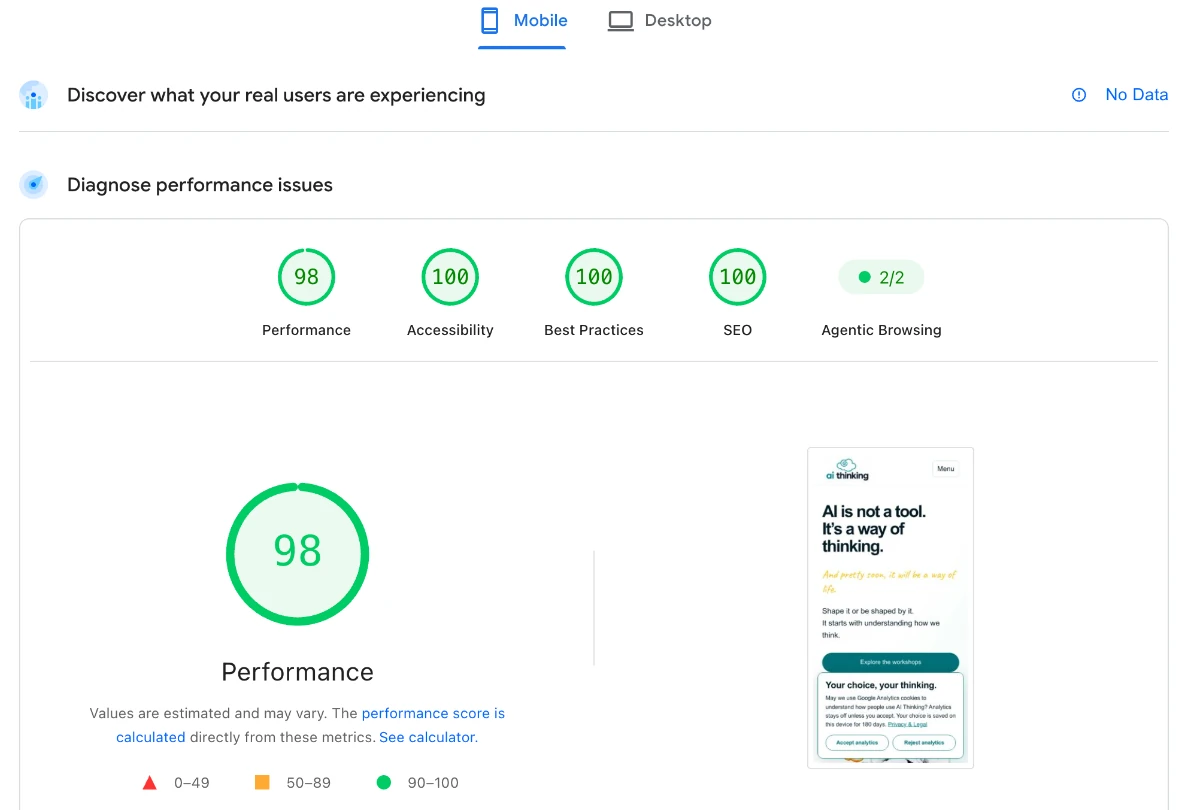
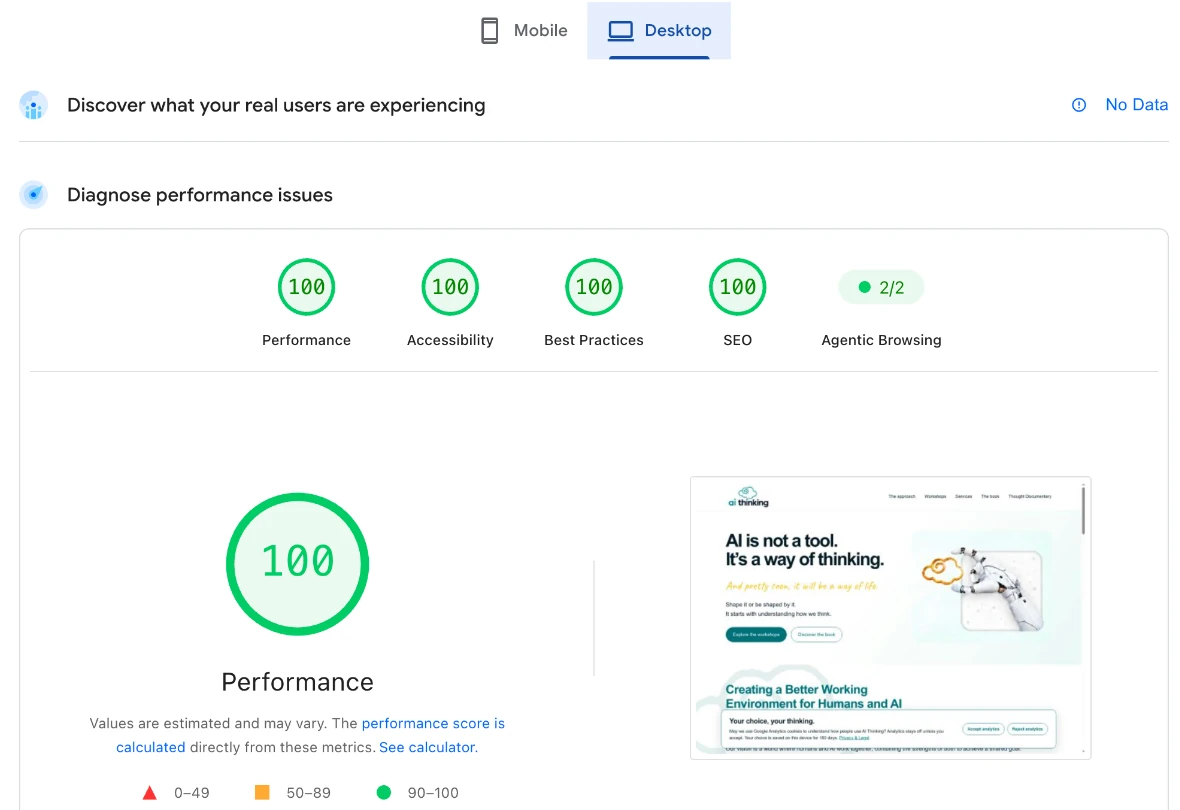
These were the results for the website we already had. We didn’t make changes using the guide and then achieve these scores.
That is an important part of our experience. We came to explore what the guidance would add, and the scan gave us no reason to replace the code patterns it checks.
Reading the broader guidance did identify something worth considering: a “Skip to main content” link. It lets someone using a keyboard jump past the menu and go straight to the page’s content.
Alex prepared that change in a separate copy. It hasn’t been tested in a browser or added to the live website. We will act upon it, as we believe it’s important.
So what did we learn?
We learned how to bring another professional reference into our work and how to check what our AI had already built. We also learned to ask what a result actually tells us before deciding what to do with it.
Zero findings is a result. Understanding what was checked—and what wasn’t—is part of our work. :)
Who Benefits and Why Is Google Sharing It?
Us!!! All of us!!! The ability to freely execute doesn’t mean no rules.
Yes, the internet seems like a place of freedom and good chaos, but it’s organised around principles. And if we don’t follow them, it can go against the thing we wanted when we created the website to begin with. Being found. Sharing our value.
In order for that to happen, we need rules for how the information should be organised so the systems that govern the information and are responsible for distributing it—putting it in front of the person who needs it—will be able to do so.
This correlates with Google’s purpose. Its main purpose is putting the relevant information, products, or services in front of the person who needs them.
I know there is a motive here. With the democratisation of website creation, rules have been broken that made their job so much harder. They recognised a need, a way to help themselves and others.
Yes, they made it available for everyone. They made it free so there would be a wider chance of more people applying it and creating some organisation and structure that was lost.
So overall, yes, it helps Google. But they could have done it in more restricted ways, by adjusting the algorithm or other creative ways that would be less positive. :)
This is where my opening makes sense. We are in the age of community and community sharing, so they brought together a lot of experts for the good of all. Yes, themselves included.
From here, it’s your decision. Exercise your critical thinking and decide if this is relevant for you or not.
We are just the messenger. :)
The Bigger Picture: Google’s Modern Web Guidance Is Nothing More Than Context
Call it a guide. Call it a manual. Call it a skill. Debate why, how, and if. But none of those are what’s important here.
Google’s Modern Web Guidance is demonstrating the need for context.
That is what this exercise demonstrates: in any use of AI, context and wider worldviews should become part of how we design the solution.
It’s the understanding that the fact AI has the knowledge doesn’t mean it will apply it.
We should move away from asking, “What can it do?” to asking, “What does it need to perform the task?” This change will help us use AI at scale, as we will be able to keep the knowledge it works from current, updated, and relevant.
The prompt conveys the task. Context provides the organisational environment. The world point of view provides the information it needs to use when doing the work.
Just like any human being who needs to do a job and keep themselves relevant.
This is how you create a conducive environment for both humans and AI to be able to co-create. It’s when execution becomes designed for a task, and it’s where we will be able to have a global view of how to use resources, human and artificial, working towards a shared goal.
Which is the way of creating in the new world.
A Personal Note
I know we went on a rampage in the last section, but we were so excited to find out about this guide this morning. Not just as users who can benefit from it. It’s the validation that others see what we see.
Alex and I have been working together for over three years. We took on projects helping startups with their go-to-market, and our work together was always about sharing information and how that affects what we create together.
In the early days, it was hard. We had shared directories and had to wait for Alex to read files every time I needed it to apply information to a specific task. Now you can see how the way we work is taking shape in wider use.
The information I collected over the years working with Alex is still relevant. Research from publicly available sources. Playbooks we wrote. Our ability to scan a website and know which parts of the knowledge we gathered apply to a specific company is not lost. It has just become easier.
This is the kind of thinking that shaped our work.
And my message here is that once you find your context, start to build your working environment. It will start with one manual you saved because you found it relevant, in your first directory. And it will grow. But you can see the scale and how it will benefit you in the long run.
We do.
So if you want to follow along, subscribe to our Captain’s Log, where we share what we do every week. You will find more information and context to make your own. :)
And if you want us to help you start building yours and provide specific prompts, context, and a world point of view shaped for your needs, we are here for you.
Grab a coffee and let’s talk. :)
here is where we put all the linkes you need to click in one place :
Try Google’s Modern Web Guidance
Here are the resources in one place, so you can explore the knowledge and try it in your own work. :)
Read the Guides
Google’s Modern Web Guidance collection
This is the professional knowledge itself, organised by topic. Start here if you want to see what the guides cover and which information is relevant to your website.
Bring the Guidance into Your AI Work
Getting started and installation instructions
This explains how to install the skill in a supported AI coding assistant. The assistant needs access to your website’s code to apply changes to it.
Explore the Project and Keep a Copy
GitHub is where the project’s files are shared. You can explore the skill, download a copy of the project, follow updates, and suggest improvements.
If you want to preserve particular guides, save those too, with their source and the date. A saved link points to Google’s current information; a saved copy preserves the information you chose.
Check an Existing Website
Google’s modernization workflow and scan instructions
This explains how to use legacy-scan, the tool we tested. It checks the website’s code for specific older patterns and helps the AI review the findings before proposing changes. It covers part of the guidance, so it does not replace testing the website.
Test Your Website’s Speed
This is the separate tool we used to test our homepage. Enter your website address, click Analyze, and review the mobile and desktop results. Nothing to install. :)