
TL;DR (Show me a summary of this article)
- We reached our ChatGPT Work limit again. This time, we saw a remaining-usage alert before we were paused.
- We found Settings → Usage, where Overview shows remaining allowance and reset times, and Analytics shows usage history.
- Top chats gave us somewhere to investigate consumption. Untitled conversations made the work harder to recognise.
- Other users on Reddit were asking how their requests connected with the allowance they consumed.
- Our recommendations: name conversations, check what remains and notice the mode, model and reasoning settings.
- The dashboard shows usage, but it still hasn’t given me enough information to plan a predictable working day or budget.
Remember our first report? Alex and Sarah were out of action for five hours, and I had no idea what we had consumed or how to plan around it.
Well, we were paused again.
Apparently, asking questions about your allowance doesn’t give you more of it. :)
But this time, just before we were stopped, something appeared on my screen: an indicator showing 8% remaining. I watched that number go down as we worked.
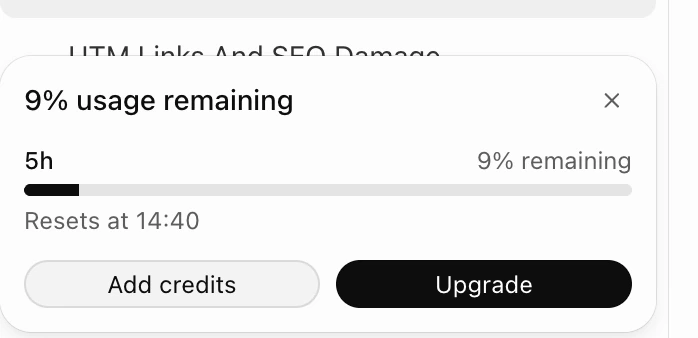
It felt like somebody from OpenAI was watching me. Somebody had read my post, and I got my answer. :)
Well, I don’t really believe that. But it sent me looking again. And this time, I found my usage dashboard.
Where can you find your ChatGPT usage dashboard?
Finding it wasn’t easy. Not for me, anyway.
Why? Because I don’t believe in navigation. I believe in asking a question and getting the link.
Alex (my ChatGPT assistant) provided a link, but clicking it took me to a new chat screen. When I challenged it, Alex provided the navigation steps.
Here’s where I found mine:
- Open Settings in ChatGPT.
- Select Usage.
- Choose Overview or Analytics.
Overview shows the remaining allowance and reset times. Analytics shows usage history.
And there it was. A dashboard filled with useful information.
Useful? Not really. :)
What did we learn from the dashboard?
My account showed a five-hour limit and a weekly limit. So the shorter allowance wasn’t a daily allowance, as I had initially thought.
The history also showed consumption by conversation and the models involved.
OpenAI’s usage guide explains that usage depends on more than the number of messages we send. The model, reasoning settings, conversation context and tools all affect consumption.
Okay. But which work had consumed ours?
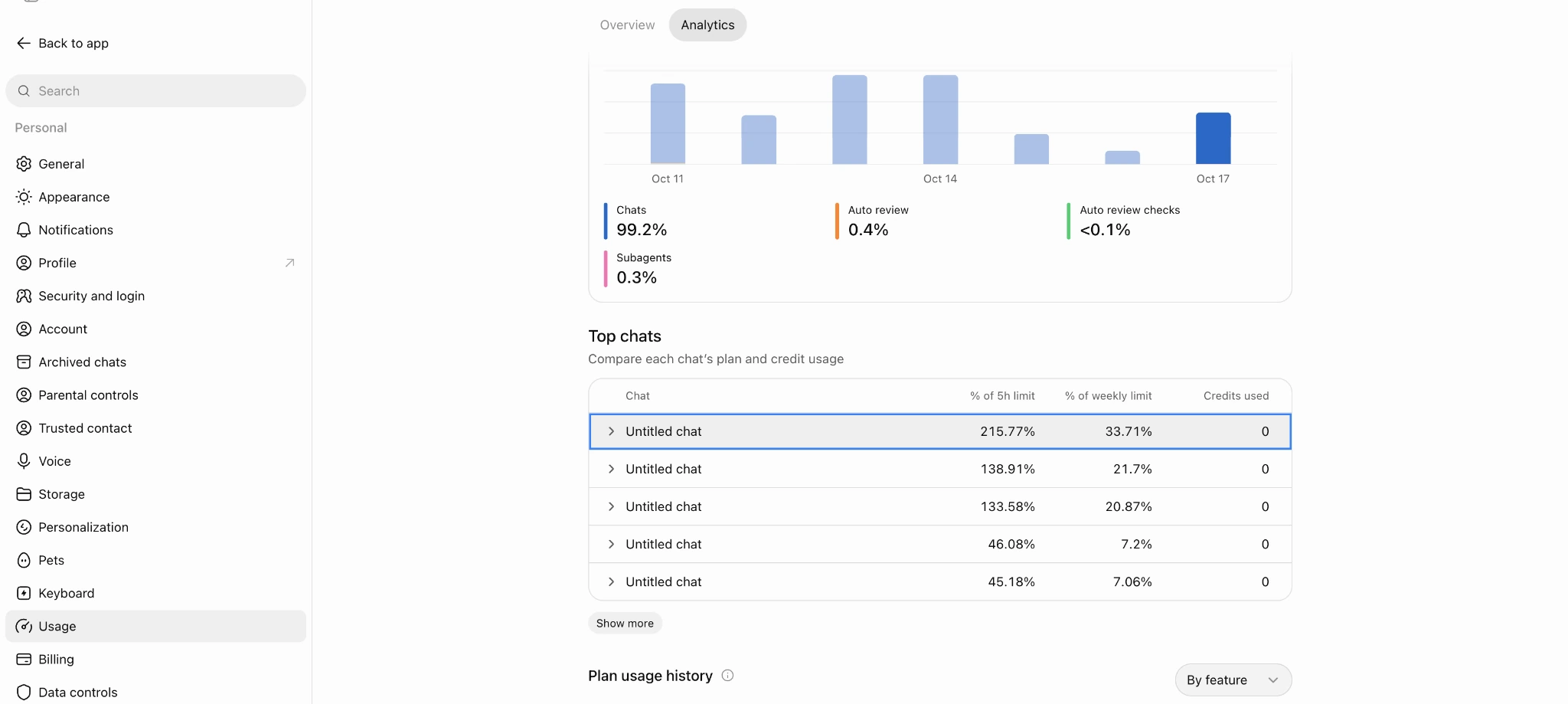
Then I looked at Top chats.
“Untitled chat.”
“Untitled chat.”
“Untitled chat.”
“Very informative, Sarah.” If Alex were human, I believe that would have been its response in a humanly sarcastic way. Wink wink. :)
One conversation showed 33.71% of a weekly allowance. Another showed 20.87%.
What were we doing in those conversations? Building the website? Editing a video? Going around in circles trying to agree on one sentence?
Naming the conversations suddenly seemed like a good idea. I think I got that one all by myself. :)
The numbers gave me somewhere to start. They didn’t yet tell me which part of the work had consumed the allowance.
Looking online for answers
I asked Alex to look for recent discussions. Were other people talking about it? Maybe they had useful information that could help me.
One Reddit user described using ChatGPT for everyday tasks and wondered why they couldn’t see how close they were to their limit.
In another discussion, someone reported that two small requests while testing Pages had created Work conversations and reduced their five-hour allowance.
Different experiences, but a familiar question: how do we connect what we ask ChatGPT to do with what it consumes?
So, no, we’re not alone here.
Chat and Work: another thing to understand
Some comments suggested staying in Chat rather than Work to avoid running out of allowance.
That made me ask Alex which one we were using.
Work, it said.
I don’t remember selecting Work. And the dashboard said 100% “Chats.” Confusing!!!
Alex explained that “Chats” in that report was a usage category. It wasn’t our remaining allowance or confirmation that we were in ordinary Chat mode.
We then checked OpenAI’s explanation. It describes Chat as suitable for questions, brainstorming, research and writing, and Work as carrying a task through to a result you can review.
Looking at that description, Work fits much of what I ask Alex to do. We were optimising the website and working on images that morning, after all.
We didn’t establish what selected the mode. But we did establish that clicking “New chat” doesn’t necessarily mean starting in Chat mode.
Same word. Different meanings. OpenAI, like you were lacking words to choose from. But confusion is the way to do it, I assume. Just saying. :)
What would we recommend?
Based on what we found so far—it could change tomorrow—here are three places to start:
- Check your remaining allowance and reset times before starting a substantial task.
- Name your conversations so you can recognise the work behind the usage history. In the sidebar, open the conversation’s three-dot menu and select Rename.
- Notice the mode, model and reasoning setting. Don’t assume every conversation uses the same setup.
For us, that setup is currently Work, GPT-6.1 Sol, Medium reasoning, and I’m quite happy with the results. I tried Luna for a while, but didn’t see a reason to prefer it for our work. I haven’t measured the difference in consumption. OpenAI’s model guide explains the available options.
These recommendations can help us investigate. We haven’t shown that they will prevent another interruption.
Conclusions: Is the dashboard helpful?
For what I wanted from it? One word: NO!! If you want it in two: HELL NO!
I can see what’s left. I can look at the history. But I still can’t use it to plan a predictable working day.
I understand that estimating what our next task will consume is difficult. Still, it would have been nice of OpenAI to offer estimates for common tasks, based on the broader information it has.
I’m trying to turn thoughts into a business and a working system. At the moment, the dashboard mostly gives me somewhere to hit refresh after every task and check whether I’m about to be left in the cold halfway through the day again. :)
Bottom line: Will I upgrade?
I think I have no choice. I’ll let you know once I do.
Will that give me the relief I’m looking for? I’m not totally convinced.
As I said before, token consumption is the new enigma in the modern working world. Especially when you build it with AI.
So buying into the dream of having a team of AI bots is giving me a new-world headache: asking myself how I can make this a fixed cost and not an estimated wild number in my budget.
Hey, I’m still a business. :)
For now, I’m still on Plus.
Personal note
We’re here to share what we find as we go along—including the parts we haven’t figured out.
Through my conversations with Alex, you can see how I ask, challenge an answer, look for information and decide what makes sense for me.
Because thoughts have no way to reveal themselves unless shared.
My hope is that by sharing ours, we will be able to see yours and understand that we don’t use AI. We think with it.
Join us here by subscribing so you can see how we are doing from week to week or on our social media channels. And if you have something you need to ask, give us a shout. :)
FAQ
Where can I find my ChatGPT usage dashboard?
I found mine under Settings → Usage. Overview shows remaining allowance and reset times. Analytics shows usage history.
Is the shorter allowance a daily limit?
For my account, it was a five-hour limit, alongside a weekly limit. I had initially mistaken it for a daily allowance.
Why did my dashboard say “Chats” when I was using Work?
Seeing “100% Chats” confused me because Alex said we were using Work. We found that “Chats” was a category in the usage report, while Chat and Work referred to modes. The report’s label didn’t tell me which mode we were using. Same word. Different meanings. :)
How can I see which conversations consumed the most usage?
Look at Top chats in Analytics. In my report, conversations were listed with consumption expressed as percentages of the five-hour and weekly allowances.
Why should I name my conversations?
Clear names help you recognise the work behind each conversation in your usage history. “Website optimisation” gives you somewhere to start when reviewing what consumed your allowance. “Untitled chat” doesn’t tell you much. :)
Does clicking “New chat” mean I’m in Chat mode?
Not necessarily. Both Chat and Work create conversations called chats, so I need to notice which mode we’re using.
Will upgrading prevent another interruption?
We haven’t established that. I’m considering upgrading, but I haven’t tested whether it will give me the predictable working day I’m looking for. For now, I’m still on Plus.