

Letting Alex become part of the business.
Email is still one of the main ways we communicate. I don’t know when you will get to read this, but one of the most basic, elementary ways AI can help us is by being on top of our email.
Email is still the preferred form of communication. I know the world is changing. We are more connected than ever, with messages on every app, group chats and video calls. Email is still there, demanding time and attention for something that is very clear and simple for all of us: the answer to the question of how we want it handled.
So I connected it.
Why connect ChatGPT to Gmail?
Because this is a first step in trying out working with AI and freeing our attention to focus on something else.
Yes, everything demands our attention. Clicking, opening, sending a few words. All of that is time spent somewhere else.
The best example I can provide is spam filters. They are a familiar example of how machine learning can help sort our email, learning to recognise patterns that indicate unwanted messages. It seems elementary compared with what we know AI can do today.
But from that small feature, a lot of us saw so much benefit. That is the best example I can give you of why email should be one of the basic things you try connecting AI to. It can show you what taking something off your plate feels like.
What will it be able to do?
That is a question of trust and how comfortable we are with letting AI work on our behalf.
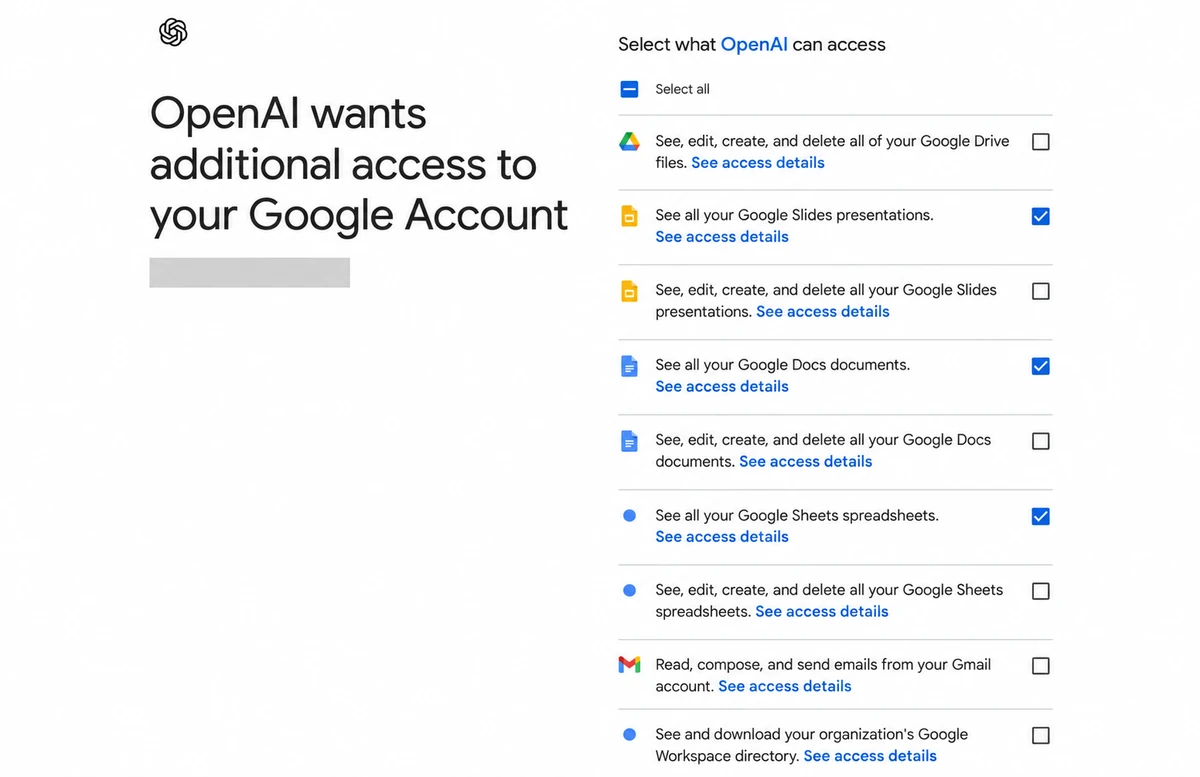
From the technical connection perspective, the Gmail permission I was offered was all or nothing. :)
For presentations, documents and spreadsheets, I could choose viewing access separately from editing access. But for Gmail, “Read, compose, and send emails” appeared together under one checkbox. I wasn’t offered a separate read-only email option on this screen.
I don’t understand why they grouped it this way, but that is the choice I was shown.
Depending on the connection and permissions, AI can help you:
- Find and read emails.
- Summarise conversations.
- Identify unanswered messages and follow-ups.
- Prepare drafts.
- Send emails when the connection supports it and you have authorised the action.
- Organise messages using supported actions such as labels or archiving.
Access to documents, spreadsheets and presentations requires the relevant Google Drive connection and permissions. Connecting Gmail alone does not automatically provide that access.
What you allow AI to do with those capabilities brings us back to trust and what you feel comfortable handing over.
How?
I used the Gmail connection available through ChatGPT. It was not a smooth ride, but we got it working. :)
The setup follows these steps. The exact names on the screen may change.
- Find the Gmail connection in ChatGPT’s settings or app directory. Check that it is available for your account.
- Choose the Google account you want to connect. If you have several accounts, check carefully. We wanted the AI Thinking business inbox.
- Review the permissions. Read what access is being requested and decide whether it fits what you want ChatGPT to do.
- Complete the connection.
- Test it with an email you know. Ask it to find a particular sender or subject, then check that it retrieved the correct conversation.
A connection showing as active is a starting point. The test tells you whether you can actually use it for the work you had in mind.
How to work with it?
There are two ways: by asking or scheduling.
By asking
Ask for what you need within a conversation.
For example, you can ask to find an email, summarise a conversation, check what you already sent or help you prepare a reply.
You bring the request into the conversation when you need it.
By scheduling
You can set up scheduled checks with instructions to:
- Tell you what arrived and what needs attention.
- Highlight messages based on your priorities.
- Identify unanswered emails and follow-ups.
- Prepare replies.
You might want a check in the morning, another before finishing your day, or a different schedule that fits how you work. The scheduled task needs to be set up separately from the Gmail connection.
Sending replies on your behalf needs explicit instructions about which messages AI may answer and what it may say. Some actions may still require approval.
What is the thought process behind it?
This is where it all connects together, and no best practices or someone else’s way of working can replace it. They can provide an idea or a good start. Like this blog.
Our thought process is something we currently don’t take the time to reflect on because we consider it insignificant. But it is one of the most important things.
What do you like? How does that reflect in your working day? What will be convenient? How much do you trust AI, and what do you feel comfortable with it doing for you?
All of those are just examples of the way we need to use our minds when working with AI.
Because our goal is for AI to complement our lives and take over things we are already very familiar with doing. Things that have become a habit, a second nature. This is where AI can bring us so much value and free our mental energy to do something else.
But this is not just a functional thing. It is a thought process. It is how we see the world and bring ourselves into it.
And there is no right or wrong here. It is in the small things: how we write an email, what style of writing we use, what we mostly care about. Maybe it is the jokes we use. Do we like our emails short or long?
All of that is you.
And when we implement AI as an extension, I want to say “of us,” but I will say “as part of the way we do things,” we should not give that up.
Because this is an expression of you. It is how people know you. By not taking the time to shape that function to reflect us, we are losing an expression of ourselves, even if you think it is just sending an email.
As we continue to adopt AI, it will be everywhere, in everything we do. If we don’t stop to notice the little things, we will lose our expression one simple task at a time.
So use this as a friendly reminder: in the email you send, there is a you. Take a few moments and think about it.
That is how we need to see the workflow, not just as a functional thing, but as a representation of us and how we think.
Things to look out for
The correct account
Check which inbox you connected, especially if you use several Google accounts.
What the connection can actually do
Access to an inbox doesn’t automatically mean every email action is available. Check the supported actions before building a workflow around them.
The right conversation
Similar subjects, older messages and separate email threads can create confusion. Check the sender, dates and messages used in the answer.
What has already happened
A draft reply is not a sent email. Finding an attachment is not the same as sending it. When tracking work, we need to check the actual outcome.
Your meaning
Read the reply before sending it. Does it express your intention? Are the details and commitments correct? Does it sound like something you would say? All in all, it is an expression of you. Don’t lose that. Have a conversation about it with the AI that is going to do it for you. :)
Optimization
When we set up the connection, we can’t predict everything. This is why it is a work in progress. Whenever you encounter something that was not optimal in how you would like things to be done, don’t forget to adjust the use of this connection. Because a connection is just a connection. What your AI does with it is the important part. Don’t expect it to always go perfectly, but as you keep optimizing, it can come close. :)
Personal message
This is my gift to humanity. I know it sounds BIG. I do believe that is what I am doing. :) One blog at a time, making the connection between the technical function and who we are.
Everything around us is a thought process. We can’t do or be anything we haven’t thought about.
I am all for AI doing stuff for us. It is needed. It is time. But not at the cost of losing our expression of self.
Not knowing that AI is a thought process will make us all blur into one thing. If we don’t stop to make our email connection reflect us, we will become like everyone else.
It is not that AI has a bad agenda. It is us not knowing how we are expressing and creating the experience of who we are.
It is up to us to remember and take our power back.